The Orbiter
Knowledge Graph
A definitive guide to how Orbiter models people, companies, and relationships in a graph database — from raw data ingestion to AI-powered path finding.
1 What is the Knowledge Graph?
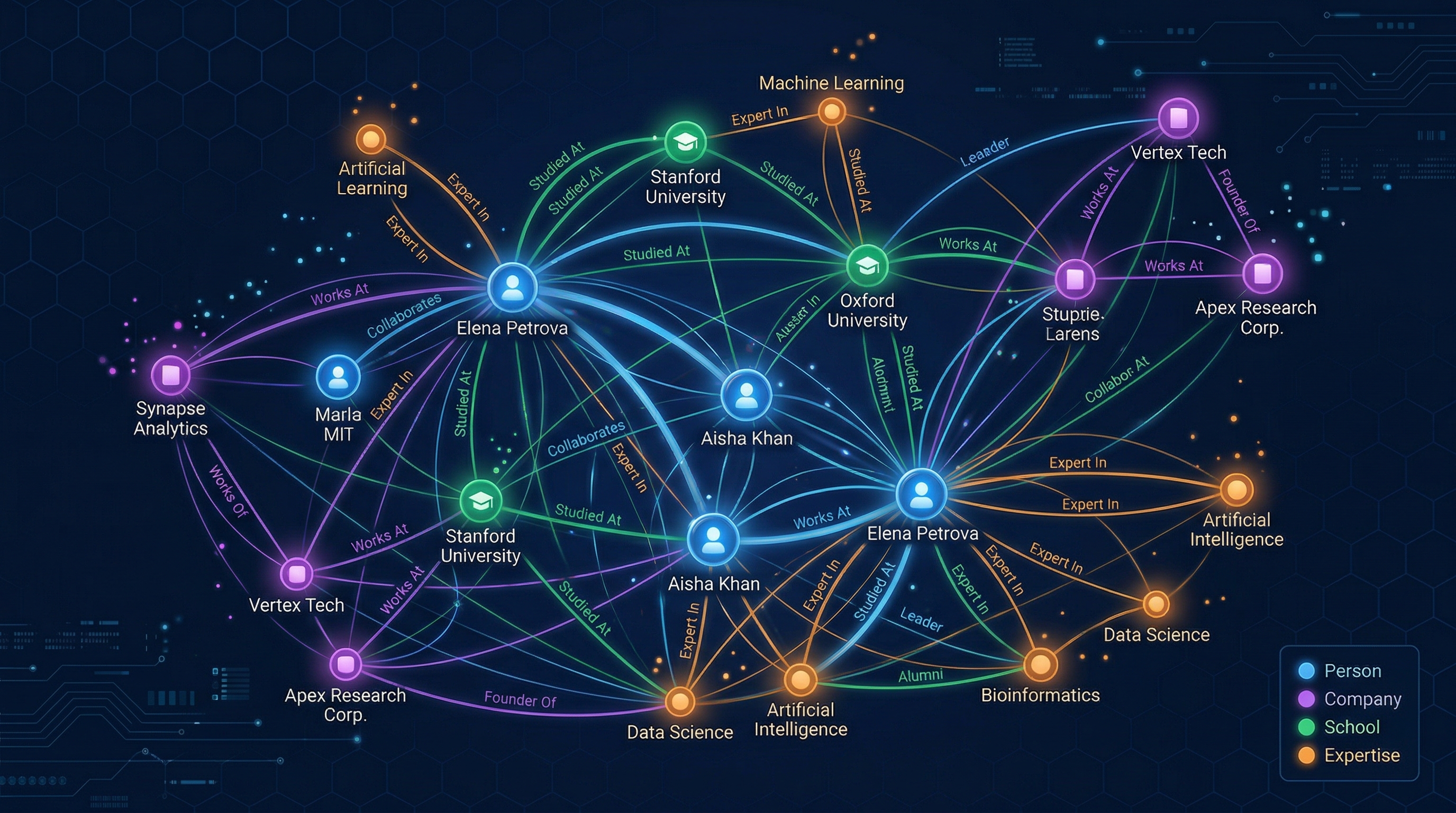
The knowledge graph is the core intelligence layer of Orbiter. It maps every person, company, school, and organization into a network of typed, weighted relationships — enabling the platform to find hidden connections between people and surface relevant introductions.
The Core Idea
Traditional CRMs store contacts as flat records. Orbiter stores them as nodes in a graph, connected by typed edges that carry meaning: "Alice FOUNDED Company X", "Bob ATTENDED Stanford", "Alice and Bob ATTENDED_TOGETHER at Stanford from 2012-2016."
This structure enables Orbiter's signature features — Leverage Loops (find the shortest, strongest path between two people), Discovery (natural language search that translates to graph queries), and Meeting Prep (automatically surface shared connections before a meeting).
Tech Stack
FalkorDB
Redis-based graph database. Cypher query language. Hosted on GCP. Graph name: live. Extremely fast — in-memory operations.
Xano
Backend platform where all enrichment logic runs. Functions process data, resolve edges, and write to FalkorDB via HTTP API calls (Cypher queries over REST).
OpenAI Embeddings
Model: text-embedding-3-small (1536 dimensions). Stored as name_embedding property on Person and Company nodes for semantic search.
2 Architecture Overview
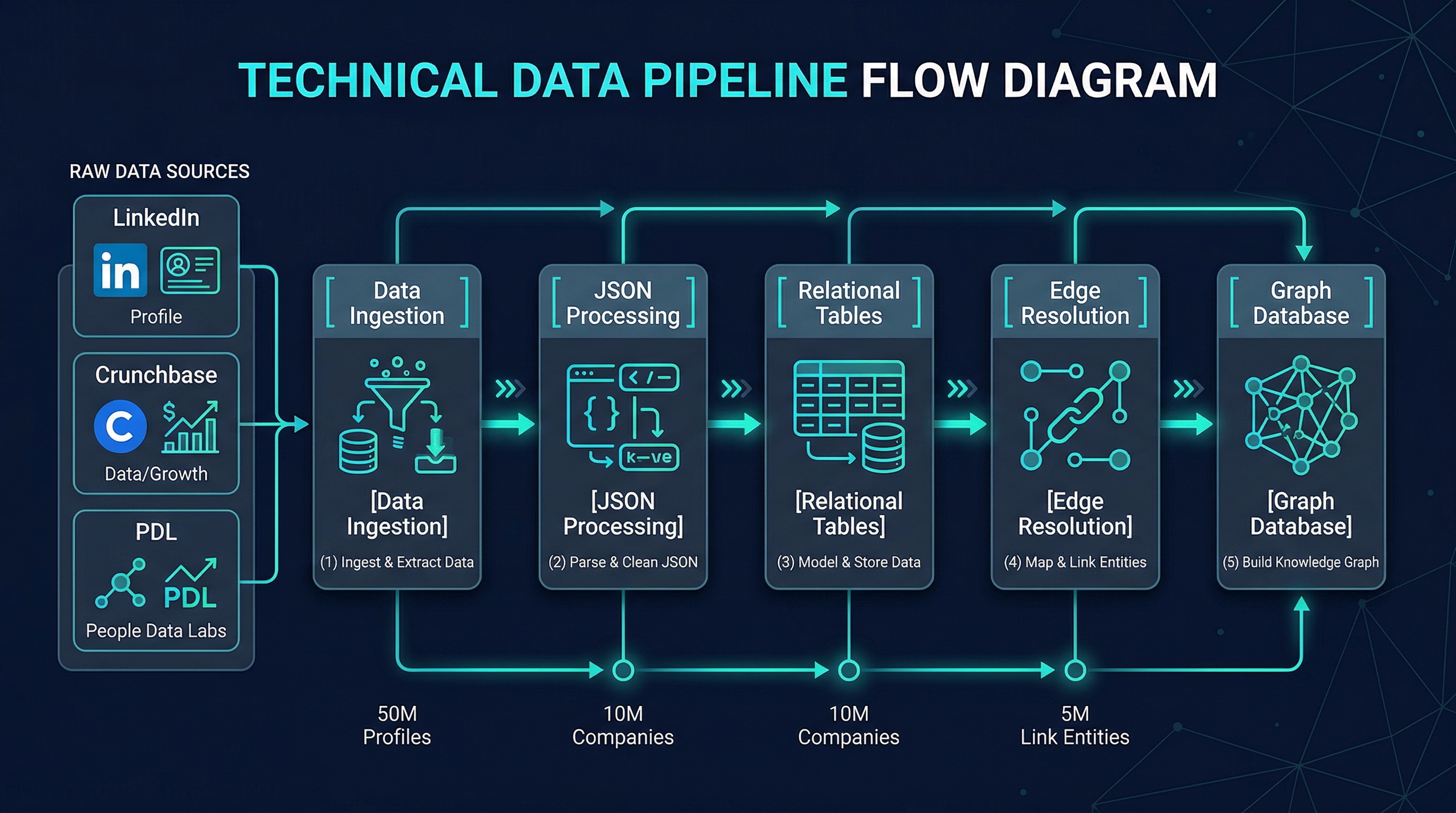
Data flows through a 4-layer pipeline: external sources feed raw JSON into Xano tables, which get processed into relational records, then resolved into graph edges, and finally written to FalkorDB.
The 4 Layers
Ingest
Process
Resolve Edges
FalkorDB
Embeddings
Raw Data Collection
External data sources (PDL, Enrich Layer, Fundable) deliver JSON blobs stored in master_person and related tables. Fields like pdl_json, enrichLayer_json hold the raw payloads.
Normalize & Extract
The process-enrich-layer function (16 sections) parses JSON into relational tables: work_history, education, certification, skill, social_link, etc.
Build Relationships
Six specialized functions resolve relational records into graph edges — matching companies, schools, and organizations to existing graph nodes or creating new ones.
FalkorDB Cypher
send-cypher and send-cypher-with-embeddings execute Cypher queries against FalkorDB via HTTP, creating/updating nodes and edges.
System Architecture Diagram
3 Node Types
Every node in the graph shares the base label :Entity plus a specific type label. There are 12 node types, each with distinct properties. The most important are Person and Company.
Primary Node Types
Person
The central node type. Represents any individual in the network.
- node_uuid — unique ID (matches master_person.id)
- name — full name
- bio_500 — AI-generated 500-word biography
- name_embedding — 1536-dim vector (from bio_500)
- headline — professional headline
- current_company — name of current employer
- current_title — current job title
- linkedin_url — LinkedIn profile URL
- avatar_url — profile photo
- visibility —
true/false(gate: bio_500)
Company
Business entities — startups, enterprises, employers.
- node_uuid — unique ID (matches master_company.id)
- name — company name
- about_500 — AI-generated 500-word description
- name_embedding — 1536-dim vector (from about_500)
- domain — primary web domain
- industry — industry classification
- founded_year — year founded
- staff_count — employee count
- linkedin_url — company LinkedIn page
- logo_url — company logo
School
Educational institutions — universities, colleges, programs.
- node_uuid — unique ID
- name — institution name
- domain — web domain
- linkedin_url — LinkedIn page
VC_Firm
Venture capital firms that invest in companies.
- node_uuid — unique ID
- name — firm name
- domain — web domain
Angel
Angel investors (individuals who invest personally).
- node_uuid — unique ID
- name — investor name
Organization
Non-company entities (certifying bodies, nonprofits, boards).
- node_uuid — unique ID
- name — org name
- domain — web domain
Location Nodes (Hierarchy)
Locations form a 3-level hierarchy: City → Region → Country. Each person's primary location creates edges through all three levels.
City
- node_uuid, name
Region
- node_uuid, name
Country
- node_uuid, name
Expertise & Funding Nodes
DomainExpertise
Top-level expertise categories (e.g., "Artificial Intelligence", "FinTech").
- node_uuid, name
- name_embedding — for semantic matching
SubDomainExpertise
Specific skills within a domain (e.g., "NLP" under "AI"). Created dynamically by LLM + vector resolution.
- node_uuid, name
- name_embedding — for semantic matching
Funding_Round
Investment rounds (Series A, Seed, etc.) linking investors to companies.
- node_uuid, name
- amount — funding amount
- date — round date
- round_type — Seed, Series A, etc.
4 Edge Types & Weights
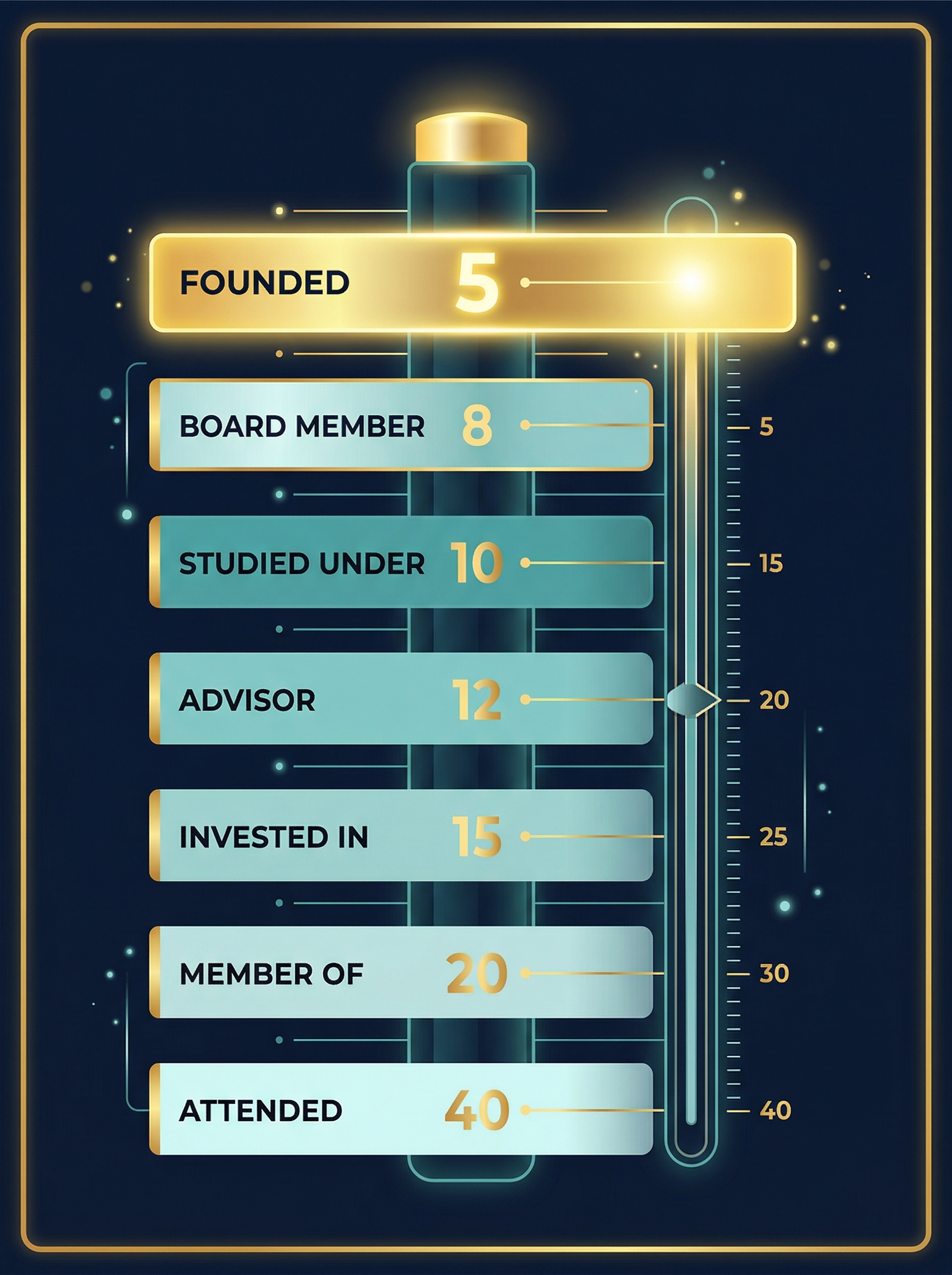
Edges are the soul of the knowledge graph. Every edge has a type (what the relationship is) and a weight (how strong it is). Lower weight = stronger relationship. Weights are critical for path-finding — the algorithm finds paths with the lowest total weight.
Complete Edge Reference
| Edge Type | Weight | From → To | Description |
|---|---|---|---|
| FOUNDED | 5 | Person → Company | Person founded the company. Strongest work relationship. |
| BOARD_MEMBER_OF | 8 | Person → Company | Person serves/served on the board of directors. |
| WORKED_AT | 5–40 | Person → Company | Employment. Weight varies by seniority (see table below). |
| STUDIED_UNDER | 10 | Person → Person | Derived: student overlapped with instructor at same school. |
| LOCATED_IN | 10 | Person → City/Region/Country | Person's primary location. Creates edges to all 3 hierarchy levels. |
| ADVISOR_TO | 12 | Person → Company | Advisory relationship to a company. |
| INVESTED_IN | 15 | VC_Firm/Angel → Funding_Round | Investment participation in a funding round. |
| RAISED | 15 | Company → Funding_Round | Company raised a funding round. |
| MEMBER_OF | 20 | Person → Organization | Membership in professional orgs, boards, associations. |
| CERTIFIED_BY | 20 | Person → Organization | Professional certification from an issuing body. |
| VOLUNTEERED_AT | 25 | Person → Organization | Volunteer work at an organization. |
| HONORED_BY | 25 | Person → Organization | Award or honor from an organization. |
| ATTENDED_TOGETHER | 35–70 | Person → Person | Derived: two people attended the same school with date overlap. Weight based on overlap duration. |
| ATTENDED | 40 | Person → School | Person attended an educational institution. |
| TAUGHT_AT | 40 | Person → School | Person taught/instructed at an institution. |
| HAS_EXPERTISE | — | Person → SubDomainExpertise | Person has expertise in a subdomain. No fixed weight (path-finding excludes expertise nodes from intermediate hops). |
| SUBDOMAIN_OF | — | SubDomainExpertise → DomainExpertise | Taxonomy: subdomain belongs to parent domain. |
| LOCATED_IN | — | City → Region → Country | Geographic hierarchy (City in Region, Region in Country). |
Work Edge Seniority System
WORKED_AT edges have dynamic weights based on the person's seniority at the company. The formula is:
weight = seniority_rank + (is_current ? 0 : 20)
This means a current C-Suite role (weight 5) is much stronger than a past individual contributor role (weight 40). The +20 penalty for past roles ensures current relationships rank higher in path-finding.
Example: A current VP role has weight 12. A past VP role has weight 32 (12+20). The seniority detection function pattern-matches title strings against known role patterns.
Derived Relationships
Some edges aren't extracted from data directly — they're computed from other edges:
ATTENDED_TOGETHER
Computed
When two people have ATTENDED edges to the same School, and their date ranges overlap, an ATTENDED_TOGETHER edge is created directly between them. Weight ranges from 35 (long overlap, 4+ years) to 70 (minimal overlap, <1 year).
STUDIED_UNDER
Computed
When a student's ATTENDED edge overlaps with an instructor's TAUGHT_AT edge at the same school, a STUDIED_UNDER edge (weight 10) is created. This is a strong relationship — having a professor in common is a powerful connection.
Edge Properties
Edges carry metadata beyond their type and weight:
| Property | Found On | Description |
|---|---|---|
weight | All edges | Numeric strength (lower = stronger) |
title | WORKED_AT | Job title at the company |
seniority | WORKED_AT | Seniority level (c_suite, vp, director, etc.) |
is_current | WORKED_AT, ATTENDED | Boolean: still active? |
start_date | WORKED_AT, ATTENDED | When the relationship started |
end_date | WORKED_AT, ATTENDED | When it ended (null if current) |
degree | ATTENDED | Degree type (BS, MBA, PhD, etc.) |
field_of_study | ATTENDED | What they studied |
role | VOLUNTEERED_AT, MEMBER_OF | Role/position within the org |
certification_name | CERTIFIED_BY | Name of the certification |
honor_title | HONORED_BY | Name of the award/honor |
overlap_years | ATTENDED_TOGETHER | Duration of school date overlap |
amount | INVESTED_IN, RAISED | Investment/round amount |
5 The Enrichment Pipeline
Enrichment is how raw data becomes graph knowledge. When a person is added to Orbiter, they go through a multi-stage pipeline that extracts, normalizes, resolves, and graphs their data. The entire pipeline runs 9 stages per person.
The 9 Pipeline Stages
Stage 1: process-enrich-layer (16 Sections)
This is the largest and most complex function. It takes the raw JSON blobs from external data sources and extracts them into normalized relational tables. It has 16 distinct sections, each handling a different data type:
- 1Basic Info
Extracts name, headline, summary, location, industry from PDL and Enrich Layer JSON. Updates master_person fields. - 2Work History
Parses employment records from JSON. Creates/updateswork_historytable entries. Deduplicates by company+title. - 3Education
Parses education records. Creates/updateseducationtable entries. Handles degree types, fields of study, dates. - 4Skills
Extracts skill names from JSON arrays. Createsskillrecords linked to the person. - 5Social Links
Extracts social media URLs (Twitter, GitHub, personal sites). Createssocial_linkrecords. - 6Certifications
Professional certifications with issuing organizations, dates. Createscertificationrecords. - 7Languages
Spoken languages with proficiency levels. Createslanguagerecords. - 8Projects
Personal and professional projects. Createsprojectrecords. - 9Volunteering
Volunteer experience with organizations and roles. Createsvolunteeringrecords. - 10Honors & Awards
Awards, recognition, honors from organizations. Createshonorrecords. - 11Publications
Published articles, papers, books. Createspublicationrecords. - 12Patents
Patent filings and grants. Createspatentrecords. - 13Courses
Courses taken or taught. Createscourserecords. - 14Recommendations
Professional recommendations received. Createsrecommendationrecords. - 15Websites
Personal and professional websites. Createswebsiterecords. - 16Avatar
Profile photo URL extraction and placeholder detection. Updatesmaster_person_avatar.
Stages 2–7: Edge Resolution
After relational data is created, edge resolution functions match records to existing graph nodes and create Cypher queries to build graph edges. Here's how each one works:
resolve-edges-education
Stage 2
For each education record: matches the school name against existing School nodes (domain match or LinkedIn URL match). If no match found, creates a new School node. Creates ATTENDED edge with degree, field of study, dates. Also computes ATTENDED_TOGETHER edges for overlapping students.
resolve-edges-work
Stage 3
For each work record: matches company name against Company nodes. Detects seniority from title pattern matching. Creates WORKED_AT edge with dynamic weight. Special handling for founders (FOUNDED edge) and board members (BOARD_MEMBER_OF).
resolve-edges-certifications
Stage 4
Matches certification issuers to Organization nodes (domain or LinkedIn). Creates CERTIFIED_BY edges. If the issuer is not in the graph, creates a new Organization node.
resolve-edges-projects-publications
Stage 5
Links projects and publications to associated organizations or companies in the graph.
resolve-edges-honor
Stage 6
Matches honor/award issuers to Organization nodes. Creates HONORED_BY edges. Three-section process: (1) cross-reference with education, (2) domain resolution, (3) LinkedIn resolution, (4) Cypher creation.
resolve-edges-volunteering
Stage 7
Matches volunteer organizations to graph nodes. Creates VOLUNTEERED_AT edges with role information.
Stage 8: complete-person-enrich
The finalization stage. After all edges are resolved, this function:
- Generates the bio_500 — an AI-written 500-word biography using all extracted data
- Creates/updates the Person node in FalkorDB with all properties including the bio
- Generates the name_embedding vector from the bio_500 text
- Stores the embedding on the node for semantic search
- Sets visibility = true (the single visibility gate)
- Creates location edges (LOCATED_IN to City, Region, Country)
- Runs expertise identification (LLM + vector resolution)
- Marks enrichment as complete in
enrich_history_person
Stage 9: run-base-company-process
Enriches the person's primary company. Creates/updates the Company node, generates about_500 bio, creates company embedding, processes funding rounds, and links investors (VC_Firm, Angel nodes with INVESTED_IN edges).
6 Vector Embeddings & Semantic Search
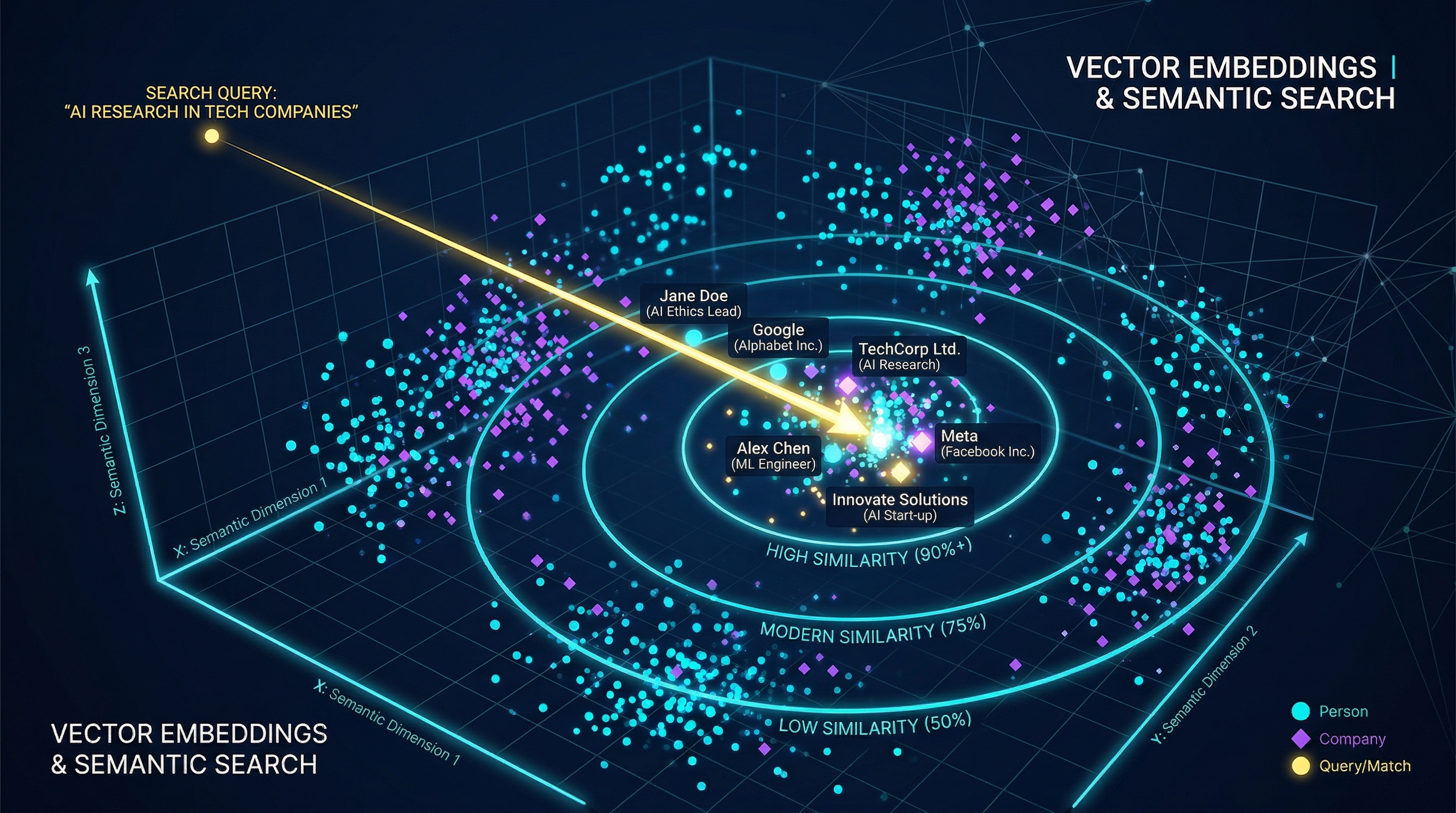
Every Person and Company node carries a 1536-dimensional vector embedding generated from their bio text. This enables semantic (meaning-based) search across the entire graph.
How It Works
Generate Bio
AI (Claude) writes a 500-word biography from all the person's extracted data — work history, education, skills, achievements. This is the bio_500.
Create Embedding
The bio_500 text is sent to OpenAI's text-embedding-3-small model, which returns a 1536-dimensional float vector.
Store on Node
The vector is stored as name_embedding on the FalkorDB node. Cypher's vecf32 type enables efficient vector operations.
Semantic Search via Cypher
The send-cypher-with-embeddings function enables natural language search:
// User searches: "AI startup founders in San Francisco"
// 1. Query text is embedded into a vector
// 2. Cypher uses vector similarity to find matching nodes:

MATCH (p:Person)
WHERE p.visibility = true
WITH p, vec.euclideanDistance(p.name_embedding, $query_vector) AS score
WHERE score < 0.45  // similarity threshold
RETURN p.name, p.headline, p.current_company, score
ORDER BY score ASC
LIMIT 20
Key Details
| Model | text-embedding-3-small (OpenAI) |
| Dimensions | 1536 |
| Distance Metric | Euclidean (lower = more similar) |
| Similarity Threshold | 0.45 (for expertise), varies by use case |
| Property Name | name_embedding on Person and Company nodes |
| Source Text (Person) | bio_500 — 500-word AI-generated biography |
| Source Text (Company) | about_500 — 500-word AI-generated company description |
| Qdrant (Separate) | Used for user documents/emails — NOT part of the knowledge graph |
7 Visibility & "Juicy Bios"
Not every person in the database is visible in the graph. Visibility is gated by a single criterion: the person must have a bio_500. This ensures only properly enriched people appear in search results and path-finding.
The Visibility Lifecycle
visibility: false
16 sections
6 functions
bio_500 written
visibility: true
What Makes a "Juicy Bio"
The bio_500 is not a dry resume summary. It's an AI-generated narrative (up to 500 words) that captures:
- Career trajectory — not just current role, but the journey
- Key achievements — companies founded, boards served, awards won
- Education highlights — degrees, notable institutions
- Expertise areas — what they're known for professionally
- Network significance — why they matter in the professional landscape
This bio serves double duty: it's displayed to users AND it's the source text for the vector embedding. A richer bio = better search results.
Completeness vs Visibility
Visible (~1,925)
bio_500 present
These people appear in search, path-finding, Discovery, Leverage Loops, Meeting Prep. They have passed through the full enrichment pipeline.
Invisible (~218)
no bio_500
These people exist in the database but are excluded from all user-facing features. Usually means enrichment failed or data was insufficient to generate a bio.
8 Path Finding & Leverage Loops
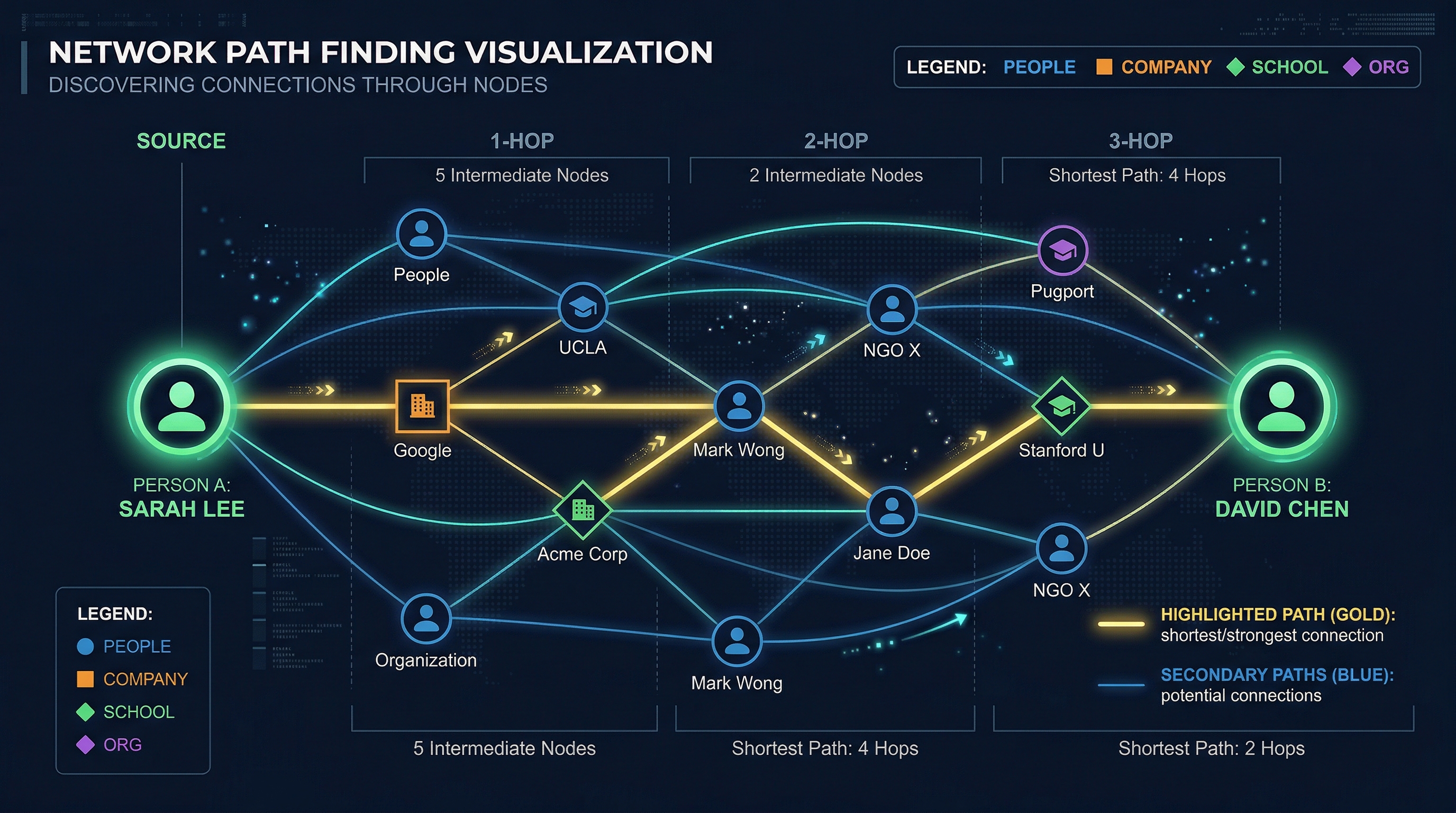
Path finding is the flagship feature of the knowledge graph. Given two people, Orbiter finds the shortest, strongest paths between them — traversing through shared companies, schools, organizations, and mutual connections.
How Path Finding Works
Variable-Length Match
Cypher query matches paths of 1–4 hops between the source and target person nodes. Each hop traverses one edge.
Filter & Exclude
Intermediate nodes of type DomainExpertise, SubDomainExpertise, City, Region, and Country are excluded — only "meaningful" entities (companies, schools, people) can be waypoints.
Rank by Weight
Paths are sorted first by hop count (fewer = better), then by total weight (lower = stronger relationships). The top paths are returned.
The Cypher Pattern
// Find paths between person A and person B
MATCH path = (a:Person {node_uuid: $source_id})
              -[*1..4]-
              (b:Person {node_uuid: $target_id})

// Exclude expertise and location nodes from intermediate hops
WHERE ALL(n IN nodes(path)[1..-1]
      WHERE NOT n:DomainExpertise
      AND NOT n:SubDomainExpertise
      AND NOT n:City
      AND NOT n:Region
      AND NOT n:Country)

// Calculate total path weight
WITH path,
     length(path) AS hops,
     reduce(w = 0, r IN relationships(path) | w + r.weight) AS total_weight

RETURN path, hops, total_weight
ORDER BY hops ASC, total_weight ASC
LIMIT 10
Path Examples
1-Hop Path (Direct Connection)
Alice —WORKED_AT(5)— Acme Corp —FOUNDED(5)— Bob
Total weight: 10. Alice and Bob both have connections to Acme Corp.
2-Hop Path (Through a Person)
Alice —ATTENDED_TOGETHER(40)— Charlie —WORKED_AT(12)— TechCo —FOUNDED(5)— Bob
Total weight: 57. Alice went to school with Charlie, who works at Bob's company.
Leverage Loops
A Leverage Loop is the user-facing feature built on path-finding. When you want to reach someone in your network, Orbiter shows you the strongest paths and suggests who to talk to first. The "loop" refers to the chain of introductions: You → Connector A → Connector B → Target.
9 Expertise System
The expertise system automatically identifies what people are expert in and organizes those expertise areas into a searchable taxonomy. It uses a two-phase pipeline: LLM identification followed by vector resolution.
Two-Phase Pipeline
llm-identify-person-expertise
Claude Sonnet 4 analyzes the person's bio_500, work history, skills, and education to identify their expertise domains and subdomains. Returns structured JSON with domain/subdomain pairs.
Example output: [{"domain": "Artificial Intelligence", "subdomain": "Natural Language Processing"}, {"domain": "FinTech", "subdomain": "Payment Infrastructure"}]
resolve-person-expertise
Each LLM-identified subdomain is embedded and compared against existing SubDomainExpertise nodes using cosine similarity (threshold: 0.45). If a close match exists, it reuses that node. If not, it creates a new SubDomainExpertise node.
This prevents taxonomy explosion — "NLP", "Natural Language Processing", and "Computational Linguistics" all resolve to the same node.
The Taxonomy Structure
// Expertise forms a 2-level hierarchy in the graph:

(Person) -[:HAS_EXPERTISE]-> (SubDomainExpertise) -[:SUBDOMAIN_OF]-> (DomainExpertise)

// Example:
(Mark Pedersen) -[:HAS_EXPERTISE]-> (Graph Databases) -[:SUBDOMAIN_OF]-> (Data Engineering)
(Mark Pedersen) -[:HAS_EXPERTISE]-> (Redis)          -[:SUBDOMAIN_OF]-> (Data Engineering)
(Mark Pedersen) -[:HAS_EXPERTISE]-> (Cypher)         -[:SUBDOMAIN_OF]-> (Data Engineering)
Why Vector Resolution Matters
10 Discovery & Text-to-Cypher
Discovery is the natural language search interface for the knowledge graph. Users ask questions in plain English, and the system translates them into Cypher queries that run against FalkorDB.
How It Works
"Find AI founders in NYC"
to Cypher
Graph query
Formatted for UI
The LLM (Claude) receives the full graph schema — all node types, edge types, properties — and generates a valid Cypher query from the natural language input. This is different from semantic search (which uses embeddings) — text-to-Cypher enables structural queries:
Semantic Search
Vector-based
"People similar to Elon Musk" — embeds the query, finds nodes with similar vectors. Best for fuzzy, conceptual searches.
Text-to-Cypher
Structure-based
"Founders who attended Stanford and worked at Google" — generates exact graph traversal query. Best for precise, multi-criteria searches.
11 Multi-Tenancy & Data Layers
The graph has multiple layers of data organization — understanding the header system and the master vs personal graph distinction is key.
The Header System
Every Xano API request that touches the graph uses two headers:
X-Data-Source
Value: live
Determines which data environment to use. Currently only "live" is active. During development, "staging" was used for testing.
X-Branch
Value: v1
API versioning. All current endpoints use v1.
Master Graph vs Personal Graph
Master Graph
Shared
The global knowledge graph containing all enriched people, companies, and relationships. Powered by external data sources (PDL, Enrich Layer, Fundable). Used for Discovery and semantic search.
Personal Graph
Per-User
Each user's imported contacts and connections overlaid on top of the master graph. Used for Leverage Loops (find paths through YOUR network) and Meeting Prep (surface YOUR connections to a meeting attendee).
Scale Plan
Current: ~2,143 people enriched. Target: 25,000 contacts + 50,000 enriched from financial/investment data. Mark's plan is to import contacts from all users' LinkedIn exports, plus enrich a large dataset of people from the financial/tech ecosystem using Fundable deal data.
12 Mark's Design Philosophy
The knowledge graph reflects specific architectural opinions from Mark Pedersen. Understanding these helps explain why certain decisions were made.
"Anti-Unstructured Graph"
Mark insists on corroborating evidence before creating edges. No edge is created from a single data source claim — it must be verified or at least cross-referenced. This means fewer false connections but higher trust.
"Bio-Bond Ontology"
Mark's conceptual model: "Bio" = the person info node (identity, properties). "Bond" = the relationship edge (type, strength, decay rate). Every entity is a bio; every connection is a bond.
"Juicy Bios, Not Dry Properties"
Embeddings are generated from rich narrative text, not from concatenated property values. A 500-word story about someone captures nuance that "CEO, AI, Stanford" never could.
"Speed Over Everything"
FalkorDB was chosen over Neo4j specifically for speed (450-500x faster by Mark's benchmarks). In-memory graph with Cypher compatibility. For a real-time product, query latency matters more than feature completeness.
"Source Reliability Hierarchy"
Not all data sources are equal. PDL provides broad coverage, Enrich Layer adds depth, LinkedIn provides first-party data (highest trust), Fundable provides financial/investment data. When sources conflict, the hierarchy determines which wins.
"Identity Resolution Before Graph"
Before any data enters the graph, identity resolution ensures "John Smith at Google" from PDL and "John Smith" from LinkedIn are the same person. The master_person table is the single source of truth for identity.
13 Production Stats & Health
Current production metrics as of March 2026. The QA enrichment pipeline addresses many of the issues identified here.
Known Issues in Production Pipeline
778 Stuck Processing Records
People whose enrich_history_person.processing = true but the function crashed mid-execution. These are "zombie" records — they appear to be enriching but are actually stuck forever.
Root cause: No try_catch in complete-person-enrich. When it crashes, processing is never set back to false.
QA fix: Wrapped in try_catch, processing flag always reset.
3 Global Scope Bugs
Certifications, honors, and volunteering functions had unscoped database queries — when enriching Person A, they could modify records belonging to Persons B, C, D, etc.
Root cause: Missing WHERE master_person_id = $input.master_person_id clauses.
QA fix: All queries now scoped to the specific person being enriched.
No Error Isolation
The 16-section process-enrich-layer function had no individual error handling. If section 4 (skills) crashed, sections 5–16 never ran.
QA fix: Each section wrapped in individual try_catch. Errors logged to crash_log, execution continues.
Empty Table Names
3 database calls in run-base-company-process used empty string "" as the table name. These calls silently fail.
QA fix: Correct table names identified and set.
QA Pipeline Results
The QA pipeline was tested across 20 people (180 stages total):
14 Glossary
Quick reference for terms Mark uses when discussing the knowledge graph.
- bio_500 / "Juicy Bio"
- AI-generated 500-word biography of a person. Used for display AND as the source text for vector embeddings. The single visibility gate.
- about_500
- Same as bio_500 but for companies. AI-generated 500-word company description.
- name_embedding
- 1536-dimensional vector stored on Person/Company nodes. Generated from bio_500/about_500 using OpenAI text-embedding-3-small.
- node_uuid
- Universal identifier for graph nodes. For Person nodes, matches master_person.id. For Company nodes, matches master_company.id.
- visibility
- Boolean flag on Person nodes. True = person appears in search/discovery. False = hidden. Gate: bio_500 must exist.
- FalkorDB
- Redis-based in-memory graph database. Uses Cypher query language. Hosted on GCP. Graph name: "live".
- Cypher
- Graph query language (same as Neo4j). Used to create nodes, edges, and query the graph. All graph operations are Cypher queries sent via HTTP.
- send-cypher
- Xano function that sends a Cypher query to FalkorDB via HTTP API and returns the result.
- send-cypher-with-embeddings
- Like send-cypher but also handles vector operations — generates embeddings from text and includes them in the Cypher query.
- send-cypher-with-paths
- Specialized function for path-finding queries. Returns structured path data with node/edge details for each hop.
- Weight
- Numeric value on edges representing relationship strength. LOWER = STRONGER. Used by path-finding to prefer strong connections.
- Edge Resolution
- The process of matching relational records (work history, education) to existing graph nodes and creating typed edges between them.
- Leverage Loop
- User-facing feature: find the shortest, strongest chain of introductions to reach a target person through your network.
- Discovery
- Natural language search feature. Text-to-Cypher: user asks in English, LLM translates to graph query.
- Bio-Bond
- Mark's ontology model. "Bio" = entity identity (person, company). "Bond" = relationship with type, strength, and decay.
- PDL (People Data Labs)
- External data source providing professional profile data (work, education, skills). Broad coverage, lower depth.
- Enrich Layer
- External data source providing deeper profile enrichment. Stored as enrichLayer_json on master_person.
- Fundable
- External data source providing financial/investment data — funding rounds, investors, deal flow.
- master_person
- The single source of truth table in Xano for person identity. All enrichment data links back to a master_person record.
- master_company
- The single source of truth table for company identity. Contains domain, industry, staff count, and links to graph node.
- enrich_history_person
- Tracks enrichment pipeline status per person per data source. The "processing" flag prevents duplicate enrichment runs.
- Stuck Processing
- When enrich_history_person.processing = true but the function has crashed. The person is "stuck" — won't be re-enriched until manually reset.
- Qdrant
- Separate vector database used for user documents and emails. NOT part of the knowledge graph — don't confuse with FalkorDB vectors.
- X-Data-Source / X-Branch
- HTTP headers on Xano API calls. X-Data-Source: "live" (which data environment). X-Branch: "v1" (API version).
Orbiter Knowledge Graph — The Definitive Guide
Generated March 30, 2026 | Research from Krisp meeting transcripts, Xano function source code, and FalkorDB live data
Prepared by Robert Boulos with Claude Code